
FLORA MCP Skill
Campaign Mockup Maker
The hero shot came back approved, and now everyone wants to see it running. Give your agent that one image and it builds the out-of-home placements, the social resizes, and the deck you present them in.
Copy the FLORA connector URL
You'll paste this URL into Claude in the next step.
Go to Claude → Customize
In Claude desktop or claude.ai, open Customize → Connectors. Name it FLORA and paste the URL.
Sign in and start creating
Opens Claude with the prompt ready — say what you want mocked up.
Start creatingRequires steps 1-2 completed first.
What you type
Once FLORA is connected, the skill runs from a sentence.
Install FLORA
Adds the marketplace, then the plugin — the MCP server and every FLORA skill.
Connect and start creating
Sign in, then ask Claude Code to generate a campaign deck.
What you type
Once FLORA is connected, the skill runs from a sentence.
Add FLORA to your MCP config
Drop this into ~/.cursor/mcp.json, or the project's .cursor/mcp.json.
Start creating
Cursor signs in through the browser the first time it calls a FLORA tool.
Paste into Cursor’s chat.
What you type
Once FLORA is connected, the skill runs from a sentence.
Add the FLORA server
Two commands: add the server, then sign in through the browser.
Start creating
The prompt points Codex at the skill, then at the job.
Paste into Codex’s chat.
What you type
Once FLORA is connected, the skill runs from a sentence.
Start with one image and it handles the rest.
Input
- A visual assetA poster, key visual or finished ad, attached to the chat or already sitting on your FLORA canvas.
- Or a line of textDescribe the ad instead and it builds the master creative first, then shows you that before it renders the other seven.
Output
- 4OOH placementsGable end, transit platform, roadside 48-sheet, construction hoarding.
- 3Social resizes1:1, 4:5 and 9:16, padded from the same plate rather than cropped.
- 1Annotated PDFEvery placement laid out with its brief printed beside it.
See your campaign everywhere
Out of Home


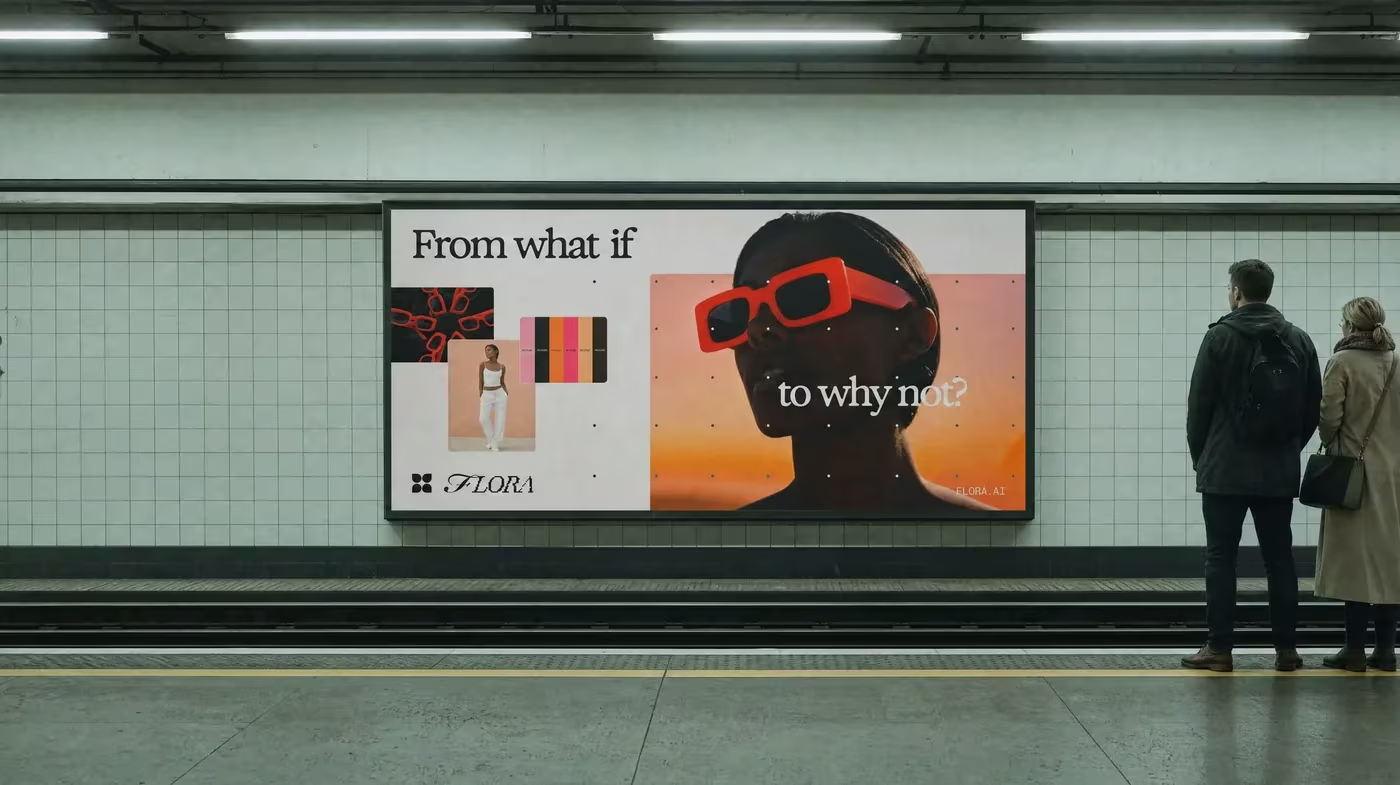

Resized Social Assets and PDF Deck



What is this?
Campaign Mockup Maker is a FLORA skill you run from Claude, Cursor or Codex. Give it approved artwork and it returns four out-of-home mockups, three social sizes, and a PDF laid out for a client presentation.
How can I use this?
In the Claude app — desktop or claude.ai — add FLORA as a custom connector and run it from any chat. Attach the artwork or point at an asset in a FLORA project. Claude Code, Cursor and Codex connect the same way.
Or use it in the browser with nothing installed at all. Open your canvas project in FLORA and click "Open in Agent": the agent drives that live canvas over WebMCP. The open canvas is the context, so "mock this poster up out of home and lay it out as a deck" is the whole prompt.
What exactly does it give me back?
Four square-on out-of-home placements — a gable end, a transit platform, a roadside 48-sheet and a construction hoarding — plus three social resizes at 1:1, 4:5 and 9:16, and an annotated PDF laying all of it out.
Does it redraw my artwork?
No. The creative is reproduced exactly and never regenerated. The placements put your approved plate into a scene; the resizes cut the same plate to a new ratio, padding or letterboxing rather than repainting it.
Which agents can run it?
Claude Code, Claude AI, Cursor and Codex all connect to the FLORA MCP server directly. In the browser there is WebMCP, where the agent drives your live canvas with nothing installed at all.
Do I need a FLORA project set up first?
No. You can attach the artwork straight to the chat and the skill will work from that. If you already have a project, you can point at an asset inside it instead, and in the browser the open canvas is the context.
What plan do I need?
The MCP server requires a FLORA paid plan, Starter and above. The skills themselves are open source and live in the flora-mcp-skills repo.